
Theme
A tour of the editor
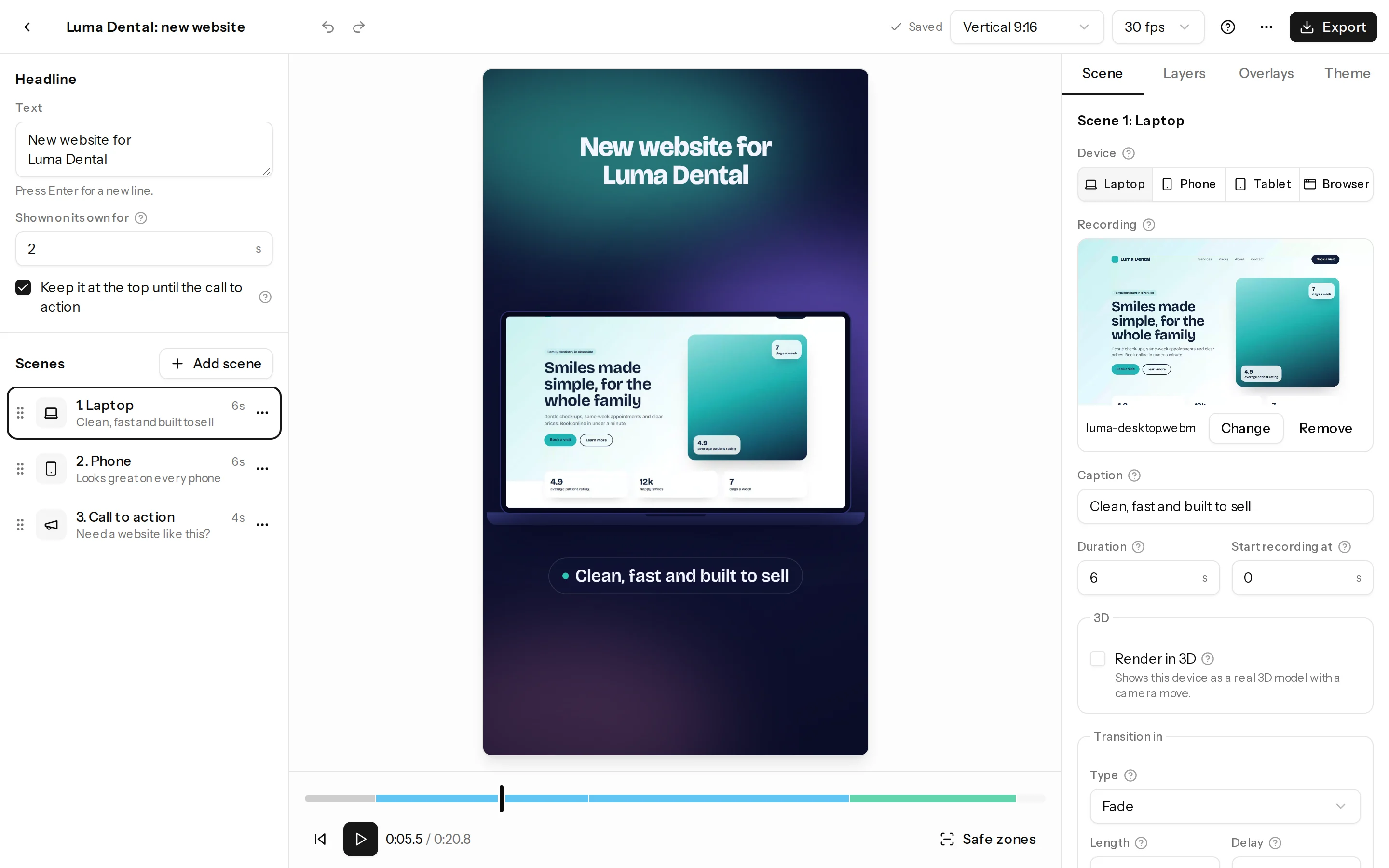
The editor has three columns: your scenes on the left, the preview in the middle and the settings on the right.
The parts
- Top bar: the reel's name, undo and redo, the save status, the format (like Vertical 9:16), the frame rate, Help and Export.
- Headline and scenes (left): the headline that opens the reel, then each scene in order. Drag the handle to reorder, and use Add scene for more.
- Preview (middle): press play or drag the bar under it to move through the reel. Click an element on the preview to select it, then drag to move it.
- Settings (right), in four tabs:
- Scene: the selected scene's device, recording, caption, timing and transition.
- Layers: text, shapes, images and stickers, for one scene or the whole reel.
- Overlays: feature lists, pins, icon cards and counters, plus zooms.
- Theme: background, font, colours, logo and brand kits.
Everything saves on its own as you work.
Tips
- The first time you open the editor, a short tour shows you around. Run it again from Help, then Restart the tour.
- Press ? for all keyboard shortcuts.
- Safe zones, under the preview, shows where TikTok, Reels and Shorts put their buttons.